How to Evaluate Third-Party Medical Accessories: A BMET Decision Framework
This guide covers how to evaluate a specific third-party accessory product — the practical decision framework before you buy. For qualifying the vendor or manufacturer behind it, see our vendor qualification checklist. For a cost-quality comparison between OEM and compatible accessories, see our OEM vs compatible analysis.

1 Why Formal Evaluation Matters
The compatible accessories market includes both excellent manufacturers and unqualified sellers — and they can be difficult to distinguish from a product listing alone. A 2021 FDA draft guidance on third-party medical device servicing raised concerns that some third-party replacement part suppliers currently operate outside the quality system requirements of 21 CFR Part 820 (FDA, "Medical Device Servicing Activities," Draft Guidance, 2021). This regulatory gap means the burden of quality verification typically falls on the hospital — and specifically on the BMET department.
According to service records analyzed across multiple health systems, accessory-related issues account for a significant majority of patient monitor service calls. In MedLinket's internal analysis of support tickets from 2023–2024 (N=4,200+ tickets across 120+ countries), approximately 65–70% of reported monitor malfunctions traced back to accessory faults rather than monitor hardware failures.

While this data comes from our own service operations and may not represent every hospital's experience, it aligns with broader industry observations that cables, sensors, and cuffs are the most frequently replaced and most failure-prone components in any monitoring fleet.
The practical implication: a structured product evaluation process is not bureaucratic overhead — it is a risk management tool that protects patient safety, reduces false alarms, and prevents the hidden costs of cheap accessories (service calls, clinical complaints, repeat purchases).
2 The Five-Area Evaluation Framework
When evaluating any third-party patient monitor accessory, assess these five areas in order. A failure in any one area should raise concerns; a failure in areas 1 or 2 should be disqualifying.
| Area | What to Check | Why It Matters |
|---|---|---|
| 1. Regulatory Compliance | ISO 13485 from IAF-accredited body; FDA 510(k) or establishment registration; CE certificate with valid Notified Body number | Confirms the manufacturer operates under a certified quality management system. Without this, every other evaluation point is unreliable. |
| 2. Material Biocompatibility | ISO 10993 biocompatibility testing for patient-contact materials; RoHS / REACH compliance; latex-free declarations | Patient-contact accessories (SpO2 sensors, ECG electrodes, NIBP cuffs) must use tested biocompatible materials. Non-compliant materials risk skin reactions and regulatory violations. |
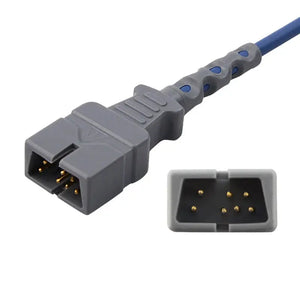
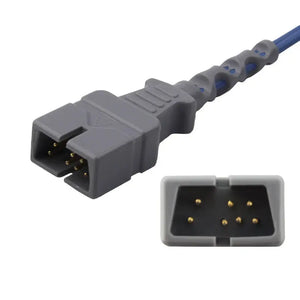
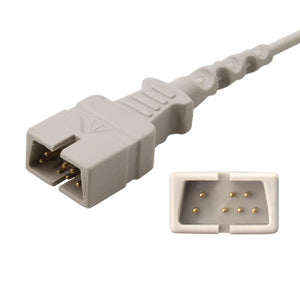
| 3. Electrical Compatibility | Connector pinout matches monitor specification; signal output within expected range; shielding meets IEC 60601-1 EMC requirements; leakage current within IEC 62353 limits | Incorrect electrical specs cause inaccurate readings, excessive artifact, or outright monitor errors. This is where many cheap accessories fail silently. |
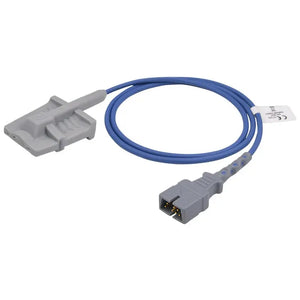
| 4. Mechanical / Connector Fit | Connector seats fully and locks securely; no excessive play or looseness; strain relief on cable; injection-molded (not glued) connectors | Poor mechanical fit is the #1 cause of intermittent "sensor off" and "leads off" alarms. It also accelerates connector wear on the monitor port. |
| 5. Clinical Accuracy Validation | Side-by-side comparison against OEM accessory on same patient or simulator; accuracy within published tolerances (e.g., ±2–3% for SpO2 per ISO 80601-2-61) | The ultimate test: does the accessory deliver clinically equivalent performance to the OEM version under real-world conditions? |
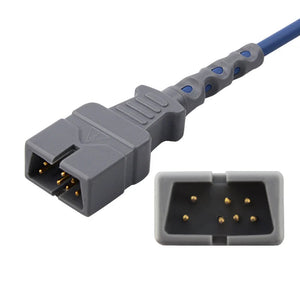
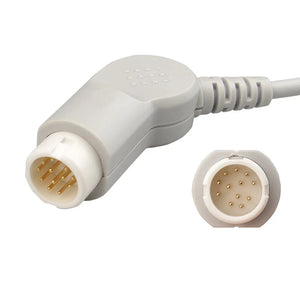
For detailed connector-level electrical specifications, see our SpO2 connector pinout reference, ECG cable connector identification guide, and IBP cable pinout specifications.
3 Supplier Documentation Checklist

Request these documents before placing any order. A qualified supplier will provide all of them without hesitation. Reluctance or inability to produce any item is a disqualifying signal.
| Document | What to Verify | Where to Check |
|---|---|---|
| ISO 13485:2016 certificate | Issuing body is IAF-accredited (TÜV, BSI, SGS, Intertek, DNV). Self-declared compliance is meaningless. | IAF CertSearch database |
| FDA establishment registration | Active status in FDA database. If 510(k) claimed, request specific clearance numbers. | FDA Device Establishment Registration & Listing |
| CE certificate | Valid Notified Body number; product scope covers the accessory types you need. | NANDO database (European Commission) |
| Product specifications | Must reference specific monitor brands/models. Generic "universal" specs are a warning sign. | Cross-reference against your compatibility matrix |
| Product liability insurance | Minimum $1M coverage; $5M preferred. Ask if they can add your organization as "additional insured." | Request certificate of insurance directly |
| Biocompatibility reports | ISO 10993 test reports for patient-contact materials (cytotoxicity, sensitization, irritation). | Request test report from supplier |
| Warranty terms (in writing) | Duration, coverage scope, and replacement process. Compare to OEM warranty terms. | Written document from supplier |
| Reference accounts | 2–3 hospital or health system references you can contact. Verify they are actual customers. | Call or email the references directly |
For guidance on how to organize and retain this documentation for Joint Commission and CMS compliance, see our BMET documentation and compliance record-keeping guide.
4 Quality Benchmarks by Accessory Type
Different accessory categories have different quality indicators. The following benchmarks are drawn from applicable IEC/ISO standards and MedLinket's field experience supporting 2,000+ hospitals across 120+ countries.
| Accessory Type | Key Quality Benchmarks | How to Verify |
|---|---|---|
| SpO2 Sensors | Accuracy ±2–3% SpO2 (per ISO 80601-2-61); low-perfusion performance (PI ≤ 0.05%); ambient light shielding; calibration matched to monitor technology (Nellcor OxiMax, Masimo SET, Philips FAST, etc.) | Request clinical validation report; compare readings vs. OEM sensor on same patient; check pleth waveform quality; test at low perfusion (cold extremity). MedLinket tests at PI=0.05%, SpO2=70%, PR=30bpm on Philips MP50. |
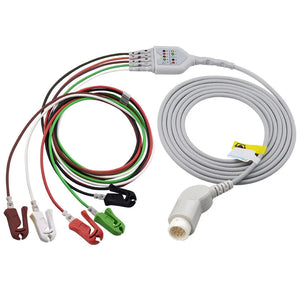
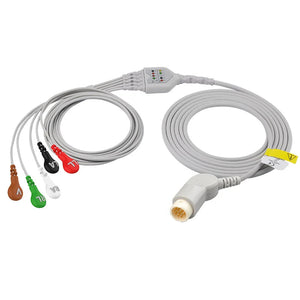
| ECG Cables | Injection-molded connectors (not glued); electrode clip spring rated ≥20,000 cycles; shielding to reject 50/60 Hz interference per IEC 60601-2-25; AAMI/IEC color coding | Visual inspection of connector construction; compare ECG trace artifact levels vs. OEM cable; flex cable while monitoring signal for intermittent breaks. See our ECG cable connector identification guide for visual reference. |
| NIBP Cuffs | TPU or high-grade nylon bladder material; welded (not sewn) seams; clear artery index marker; correct sizing per limb circumference range | Leak test: inflate to 200 mmHg, hold 60 seconds, ≤5 mmHg drop acceptable. Check seam integrity under inflation. Compare measurement vs. OEM cuff or reference sphygmomanometer. See NIBP hose connector specifications for fitting compatibility. |
| Temperature Probes | Thermistor accuracy ±0.1°C; correct resistance specification — YSI 400 and YSI 700 series are electrically incompatible; cable insulation integrity | Measure probe resistance with multimeter at known room temperature; compare to expected value from YSI curve. Test against patient simulator at 37°C and 40°C. See our YSI 400 vs 700 comparison guide for resistance specifications. |
| IBP Transducers | Sensitivity within ±2%; zero-drift-free performance; correct connector type (Abbott, UTAH, Edwards, BD, Argon, B.Braun, PVB); sterile packaging integrity for disposable units | Zero calibration test; apply known pressures (0/100/200 mmHg) via simulator; check waveform fidelity; verify flush valve flow rate. See our IBP transducer troubleshooting guide for common failure modes. |
| EtCO2 Water Traps | Proper moisture separation without flow restriction; secure fit to gas sampling module; no leaks at connection points | Connect to module; verify flow check passes; inspect for leaks at connections; run continuous CO2 monitoring for 2+ hours to verify no drift caused by moisture contamination. |
For the underlying cable specifications that affect all accessory types — shielding effectiveness, impedance tolerances, and biocompatible jacket materials — see our medical cable specifications guide.
5 30-Day Bench Evaluation Protocol
Documentation and measured data — not opinions — should drive your purchasing decision. This protocol turns a subjective "it seems fine" into an objective, auditable evaluation record.
Phase 1: Desktop Review (Days 1–5)
Collect and verify all supplier documentation from the checklist in Section 3 above. Verify the ISO certificate issuer against the IAF CertSearch database. Search the FDA establishment registration database for active status. Cross-check product specifications against your monitor fleet inventory. Any supplier that cannot produce required documents should be disqualified at this stage — do not proceed to sample testing.
Phase 2: Sample Testing (Days 5–15)
Request evaluation samples — most qualified suppliers provide these free or at reduced cost. Test each accessory type on your actual monitors (not just in theory) using the functional tests listed in Section 4 above. Compare side-by-side against the current OEM accessory on the same patient or patient simulator. Document results with measured values, not just pass/fail.

Phase 3: Clinical Floor Trial (Days 15–30)
Deploy samples on one nursing unit or department for real-world clinical use. Track these metrics and compare against your baseline OEM performance data from the same unit:
| Metric | How to Measure | Acceptable Threshold |
|---|---|---|
| Alarm frequency | Count "sensor off" / "leads off" / "check sensor" alarms per patient-day | ≤ OEM baseline rate |
| Connection reliability | Track connector failures or intermittent signal drops | Zero failures during trial period |
| Clinical staff feedback | Written feedback from 3–5 bedside nurses or RTs on comfort, ease of use | No significant complaints vs. OEM |
| Reading accuracy | Spot-check readings vs. OEM accessory on same patient at random intervals | Within published accuracy spec (e.g., ±2% SpO2) |

Phase 4: Decision and Documentation (Day 30+)
Compile all data into a one-page evaluation summary: supplier credentials, bench test results, clinical trial metrics, staff feedback, cost comparison, and risk assessment. Present to your Value Analysis Committee (VAC) or equivalent. If approved, negotiate volume pricing and establish a replacement schedule based on the supplier's published lifespan data and your own PM cycle.

Keep your evaluation documentation even after making a purchasing decision. If a quality issue arises months later, your documented evaluation process demonstrates due diligence — critical for Joint Commission surveys, CMS compliance audits, and internal accountability. For retention timelines and organizational templates, see our documentation compliance guide.
6 Red Flags: When to Walk Away
Any single item below should trigger serious concern. Multiple items should be disqualifying.
| 🚨 Red Flag | Why It Matters |
|---|---|
| Cannot produce ISO 13485 certificate — or it is self-issued / from an unrecognized body | No verified quality management system = no assurance of consistent manufacturing |
| No FDA registration number, or the number cannot be found in the FDA database | Indicates possible unauthorized manufacturing or false regulatory claims |
| Claims "universal compatibility" without specifying exact monitor models and technology platform | SpO2 technologies (Nellcor, Masimo, Philips) are electrically incompatible — "universal" is physically impossible |
| No physical factory address — only a trading company or P.O. box | Trading companies cannot control manufacturing quality; no factory = no process control |
| Price dramatically lower than every other compatible supplier | Usually indicates substandard materials, absent QC testing, or uncalibrated components |
| No product liability insurance or refuses to provide certificate | Your hospital assumes all risk if a patient safety incident occurs |
| No lot numbers or batch traceability on products | Makes recalls and quality investigations impossible; violates FDA 21 CFR 820.65 traceability requirements |
| Refuses to provide evaluation samples before a full order | Qualified manufacturers welcome evaluation — it demonstrates confidence in product quality |
Many compatible accessories look identical externally but differ dramatically in internal construction, materials, and testing rigor. A sensor that costs $15 instead of $40 may have uncalibrated LEDs, thinner cable shielding, glued (not injection-molded) connectors, and no clinical validation. The failure cost — service calls, false alarms, clinical complaints, and potential patient safety events — almost always exceeds the initial purchase savings. For a detailed cost-benefit analysis, see our BMET cost-saving strategies guide.
7 What a Qualified Supplier Looks Like
We present MedLinket's own credentials as a reference point for what BMETs should expect from any qualified compatible accessories supplier — not as a sales pitch, but as a verification template. Apply the same criteria to every supplier you evaluate.
| Evaluation Criterion | MedLinket Data | How to Verify |
|---|---|---|
| ISO 13485 | TÜV-audited ISO 13485:2016; also ISO 9001:2015 and MDSAP certified | Request certificate; verify TÜV registration number; cross-check IAF CertSearch |
| FDA | 19 FDA 510(k) clearances; active FDA establishment registration | Search FDA 510(k) database and establishment database |
| CE / International | 48 CE Class II product categories; MHRA (UK) registration; Brazil ANVISA; Australia TGA; Japan certifications | Request certificates by market; verify Notified Body numbers |
| Manufacturing | 3 owned factories (Shenzhen, Shaoguan, Indonesia); 3,500+ molds; 16,651+ product variants; closed-loop production from R&D to delivery | Request factory photos or virtual tour; schedule site audit |
| Testing | 100% factory testing on every unit; SpO2 sensors tested at PI=0.05%, SpO2=70%, PR=30bpm | Request test protocol documentation; ask about incoming material QC |
| Product liability | Up to $5M USD; additional-insured certificates available for distributors and hospitals | Request insurance certificate; verify with insurer |
| Patents | 45 utility model + 8 invention + 26 design + 1 PCT international + 13 software copyrights | Request patent list; search national patent databases |
| References | 2,000+ hospitals across 120+ countries; reference clients include Royal Victoria Hospital (UK), Institut Hospitalier Jacques Cartier (France); 14 countries with >$1M annual sales | Request 2–3 reference contacts in your region |
| Support | 1-hour response time; 2-day repair/quote turnaround; free pre-purchase compatibility verification; annual on-site service available | Test the response: send a compatibility inquiry and time the reply |
Ready to Evaluate MedLinket?
We provide free evaluation samples, full qualification documentation, and pre-purchase compatibility verification for every monitor brand in your fleet. No commitment required.
8 Frequently Asked Questions
What documents should I request from a third-party medical accessory supplier?
Request at minimum: ISO 13485 certificate from an IAF-accredited audit body, FDA registration or 510(k) clearance numbers, CE certificates where applicable, product specifications referencing your specific monitor models, product liability insurance certificate, ISO 10993 biocompatibility reports for patient-contact materials, warranty terms in writing, and verifiable reference hospital accounts. A qualified supplier provides all of these without hesitation.
How long should a third-party accessory evaluation take?
A thorough evaluation typically takes 30–90 days: 5 days for desktop document review, 10 days for bench testing with samples on your actual monitors, and 15–60 days for clinical floor trial. The evaluation costs almost nothing (most suppliers provide free samples), and the data you collect protects your department during Joint Commission surveys and procurement reviews.
What are the biggest red flags when evaluating a third-party accessory?
The three most critical red flags are: inability to produce ISO 13485 certification from a recognized audit body, no FDA registration number or a number that cannot be found in the FDA database, and claiming "universal compatibility" without specifying exact monitor models and technology platforms. SpO2 technologies like Nellcor, Masimo, and Philips are electrically incompatible — a "universal" SpO2 sensor is physically impossible. Price dramatically below all competitors is also a strong warning signal.
How do I verify if a supplier's ISO 13485 certificate is legitimate?
Check the certificate's issuing body against the International Accreditation Forum (IAF) CertSearch database. Recognized certification bodies include TÜV, BSI, SGS, Intertek, and DNV. If the certificate is "self-declared" or issued by an entity with no IAF accreditation, it provides no meaningful quality assurance. You can also contact the certification body directly to confirm the certificate is active and covers the product scope you need.
Should I evaluate every accessory type separately, or approve a supplier based on one product?
Evaluate each accessory category you plan to purchase separately. A supplier may excel at ECG cables but have weaker SpO2 sensors, or vice versa. The documentation review (ISO, FDA) covers the supplier overall, but bench testing and clinical trials should be product-specific. Start with the highest-volume, lowest-risk category (often NIBP cuffs or ECG cables), then expand based on results.
What is the difference between evaluating a product vs. qualifying a vendor?
Product evaluation (this guide) focuses on whether a specific accessory meets technical and clinical performance requirements for your monitors. Vendor qualification focuses on whether the company behind the product has the organizational capabilities, certifications, and infrastructure to be a reliable long-term supply partner. Both are necessary — a great product from an unreliable vendor creates supply chain risk. For vendor qualification criteria and a scoring template, see our vendor qualification checklist.
9 Related BMET Resources
About MedLinket
MedLinket has manufactured compatible patient monitor accessories since 2004 — 21+ years of specialization in life signal acquisition and transmission. Certified ISO 13485:2016 (TÜV), MDSAP, with 19 FDA 510(k) clearances, 48 CE Class II categories, and registrations in 6+ regulatory markets. Three owned factories (Shenzhen, Shaoguan, Indonesia), 3,500+ molds, 93+ patents. Serving 2,000+ hospitals across 120+ countries.
We welcome formal evaluation and provide free qualification documentation and evaluation samples to any BMET department considering compatible alternatives.
Contact: marketing@med-linket.com | WhatsApp: +86 189 2972 7044 | 1-hour response guarantee