📌 Article Scope
This is a Mindray-specific BMET technical reference. For multi-brand error codes and general troubleshooting methodology, see Patient Monitor Error Codes: Complete BMET Troubleshooting Guide. For multi-brand SpO2 connector pin-out references, see SpO2 Connector Pinout Reference. For the other major brand guide, see Philips & GE Patient Monitor Accessory Guide.
📋 In This Guide:
Mindray patient monitor troubleshooting presents unique challenges for BMET teams — particularly around SpO2 technology compatibility, the BeneVision modular architecture, and identifying the correct accessory connector type across the Mindray product family. This guide provides a BMET-level technical reference for the Mindray monitor lineup, covering Mindray monitor error messages, SpO2 compatibility, ECG connector identification, IBP configuration, and compatible accessory solutions for the BeneVision, iMEC, Passport, and DPM series.

Mindray Monitor Series Overview
Understanding the Mindray product family structure is the first step in correct accessory identification. Mindray's monitoring line has evolved significantly, and accessories from one series are not always interchangeable with another:
| Series | Key Models | Architecture | Primary Market |
|---|---|---|---|
| BeneVision N-Series | N12, N15, N17, N19, N22 | Modular — plug-in parameter modules | ICU, OR, High Acuity |
| BeneView T-Series | T5, T8, T1 | Modular — compatible with BeneVision modules | ICU, Step-Down, Transport |
| iPM / iMEC Series | iMEC 8, iMEC 10, iPM 8, iPM 10, iPM 12 | Multi-parameter module (integrated) | General Ward, Step-Down |
| Passport Series | Passport 2, Passport 8, Passport 12, Passport V | Compact multi-parameter | Transport, Emergency |
| DPM Series | DPM 6, DPM 7 | Mid-range integrated | General Ward, Clinic |
| PM Series | PM-7000, PM-8000, PM-9000 | Legacy integrated | General Ward (legacy fleet) |

Common Mindray Error Messages and Troubleshooting
For the complete cross-brand error code database, see our patient monitor error codes troubleshooting guide. Below are Mindray-specific error messages with root-cause analysis.
SpO2 Error Messages
| Error Message | Likely Cause | First Action |
|---|---|---|
| SpO2 Sensor Off | Sensor disconnected or not detected at patient end | Check patient-side connection; reseat sensor; clean contact pins |
| SpO2 No Sensor | Monitor-side cable not detected; cable or module fault | Swap adapter cable; check module seating in BeneVision chassis |
| SpO2 Low Perfusion | Insufficient pulse signal — patient physiology or sensor placement | Relocate sensor to better-perfused site; verify patient status |
| SpO2 Searching Pulse | Signal acquisition in progress; motion artifact; sensor placement | Reduce patient motion; verify sensor position and pressure |
| SpO2 Sensor Error | Sensor calibration data unreadable (Nellcor EEPROM); or technology mismatch | Swap sensor; verify technology compatibility with installed module |
| SpO2 Interference | Ambient light interference; motion artifact | Shield sensor from light; reduce patient motion; try alternative site |
If SpO2 errors persist after swapping sensors, the issue may be in the SpO2 module itself. For BeneVision series, try reseating the module in the chassis. For detailed SpO2 connector electrical specifications, see our SpO2 connector pinout reference.
ECG Error Messages
| Error Message | Likely Cause | First Action |
|---|---|---|
| Lead Off [lead name] | Specific electrode or leadwire connection failure | Check electrode adhesion; reseat leadwire clip; replace electrode |
| All Leads Off | Trunk cable disconnected or failed; all electrodes detached | Check trunk cable monitor-side connection; swap trunk cable |
| ECG Noisy Signal / High Noise | Electrode placement issue; skin preparation; EMI interference | Replace electrodes; improve skin preparation; check for EMI sources nearby |
| Pacemaker Not Detected | Pacemaker detect mode disabled; leadwire configuration issue | Enable pacemaker detection in ECG settings; verify leadwire placement |
For ECG connector identification across all brands (not just Mindray), see our ECG cable connector types identification guide. For ECG lead placement guidance, see ECG placement guide for 3, 5, and 12-lead configurations.
NIBP Error Messages
| Error Message | Likely Cause | First Action |
|---|---|---|
| NIBP Measurement Failed | Cuff leak; patient motion; arrhythmia; cuff sizing error | Check cuff application; run leak test; verify correct cuff size for patient |
| NIBP Cuff Loose | Cuff applied too loosely | Re-apply cuff; check that artery marker aligns with brachial artery |
| NIBP Overpressure | Pressure exceeded safety limit; usually a cuff/pneumatic fault | Check cuff and hose for blockage; run NIBP self-test from maintenance menu |
| NIBP Air Leak | Hose or cuff bladder leak | Isolate hose vs. cuff; perform leak test at 200 mmHg for 60 seconds |
For complete NIBP error diagnosis including the cuff leak test procedure, see NIBP measurement errors troubleshooting. For Mindray NIBP hose connector identification, see NIBP hose connector specifications.
Mindray SpO2 Compatibility: The Critical Details
Mindray SpO2 compatibility is the most frequently misunderstood accessory topic for Mindray monitors — and the source of most "sensor error" messages on Mindray equipment in multi-brand environments.
Mindray SpO2 Technology Variants

Mindray monitors can be configured with multiple SpO2 technologies. The technology installed determines which sensor and cable type will work:
| SpO2 Technology | Monitors | Connector Type | Sensor Compatibility |
|---|---|---|---|
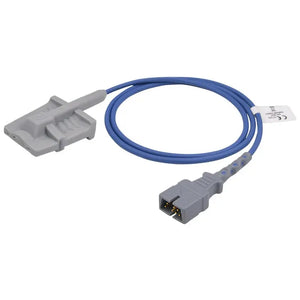
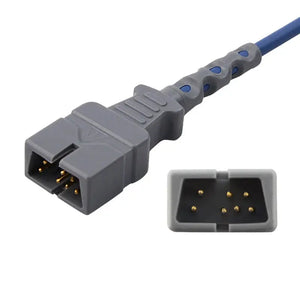
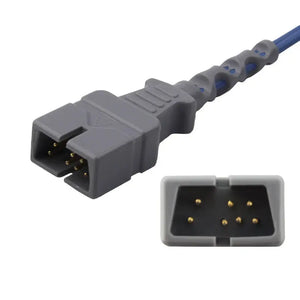
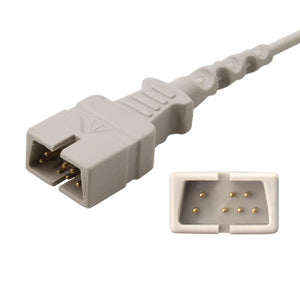
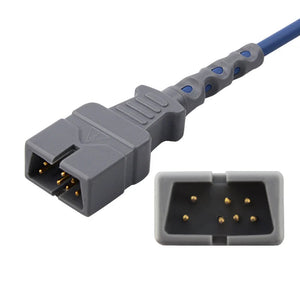
| Mindray Native | BeneVision with Mindray SpO2 module; iPM/iMEC; DPM; Passport | Mindray 6-pin proprietary (D-sub style) | Mindray-branded sensors; compatible sensors with Mindray 6-pin |
| Nellcor (OxiMax) | BeneVision with optional Nellcor module; some Passport variants | Nellcor DB9 (9-pin D-sub) | Nellcor OxiMax compatible sensors |
| Masimo SET | BeneVision with optional Masimo module; selected Passport variants | Masimo LNCS (15-pin proprietary) | Masimo LNCS compatible sensors |
How to Confirm Which SpO2 Module Is Installed
- Power down the monitor or navigate to the system information screen (Mindray menu path: Menu → Maintenance → Module Info)
- On the Module Info screen, identify the SpO2 module type — it will show the technology name (Mindray/Masimo/Nellcor) and module model number
- Alternatively, open the parameter module bay door and read the module label directly — the module is labeled with the SpO2 technology and a model designation
- Match the identified technology to the correct connector type using the table above, then order the matching SpO2 adapter cable or direct-connect sensor
For complete SpO2 connector pinout wiring diagrams for all technologies (including Mindray native, Nellcor OxiMax, Masimo SET, Philips FAST, and GE TruSignal), see our SpO2 connector pinout reference. For a cross-brand compatibility matrix, see the patient monitor accessory compatibility matrix.
Mindray ECG Connector Types
Mindray uses a proprietary ECG connector system that varies across monitor generations. For a complete ECG connector identification guide covering all major brands, see ECG Cable Connector Types: Identification Guide for BMETs.

Mindray ECG Connector Quick Reference
| Monitor Series | Monitor-Side Connector | Lead Configurations | Compatible Cables |
|---|---|---|---|
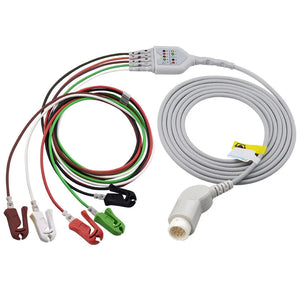
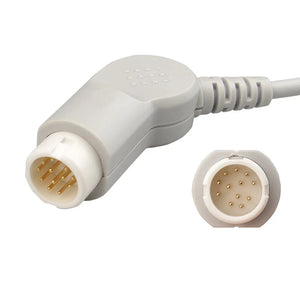
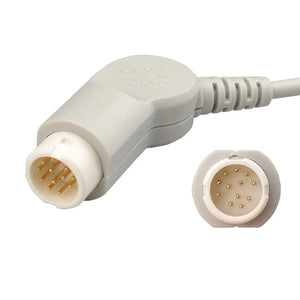
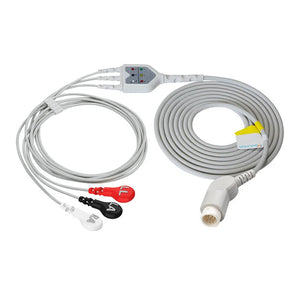
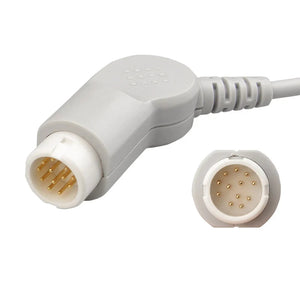
| BeneVision N/T-Series | Mindray proprietary large D-sub style (12-pin) | 3-lead, 5-lead, 12-lead | BeneVision trunk cables |
| iPM / iMEC Series | Mindray smaller proprietary connector | 3-lead, 5-lead | iPM/iMEC ECG cables |
| Passport / DPM Series | Passport-specific connector format | 3-lead, 5-lead | Passport-specific trunk cables |
| PM Series (Legacy) | Older Mindray/Datascope connector | 3-lead, 5-lead | PM-series trunk cables |
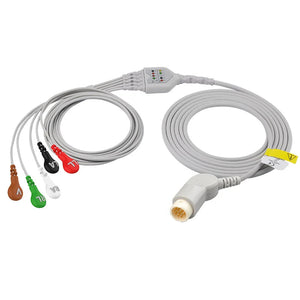
Browse all Mindray-compatible ECG options: 3-lead ECG cables · 5-lead ECG cables · trunk cables · telemetry leadwires · neonatal trunk cables
Mindray IBP Configuration

Mindray monitors support IBP monitoring through proprietary IBP cable interfaces. The monitor-side connector is Mindray-specific, but the transducer-side connector depends on which disposable transducer brand your facility uses (Abbott, UTAH, Edwards, BD, B.Braun, or Argon Maxxim).
| Transducer Interface | Compatible Mindray IBP Cable |
|---|---|
| UTAH | Mindray IBP cable for UTAH transducer |
| Edwards | Mindray IBP cable for Edwards transducer |
| Argon Maxxim | Mindray IBP cable for Argon transducer |
| B.Braun | Mindray IBP cable for B.Braun transducer |
| BD (formerly Medex) | Mindray IBP cable for BD transducer |
| Abbott | Mindray IBP cable for Abbott transducer |
For IBP cable pinout specifications and transducer signal requirements, see our IBP cable pinout and signal specifications. For IBP troubleshooting (zeroing, drift, damped waveforms), see IBP transducer troubleshooting. Browse all disposable IBP transducers and Mindray IBP adapter cables.
Mindray PM Special Considerations for BMETs
When performing preventive maintenance on Mindray monitors, keep these Mindray-specific points in mind (for the complete PM workflow, see our patient monitor PM checklist):
- Battery management: Mindray recommends the full charge-discharge-recharge cycle every 3 months for lithium-ion batteries in BeneVision and iPM series. Track battery cycles separately from PM dates in your CMMS.
- Module seating verification: For BeneVision N-Series, remove and reseat each parameter module during PM. Inspect module contacts for corrosion or debris. A poorly seated module is a common cause of intermittent parameter errors.
- SpO2 module identification: Document which SpO2 technology (Mindray/Nellcor/Masimo) is installed in each BeneVision unit. This prevents compatibility errors when accessories are replaced between PMs.
- Software version documentation: Record the software version during each PM (Menu → System Info). Mindray periodically releases firmware updates that affect alarm behavior and parameter algorithms.
- Accessory inspection: Test all connected accessories during PM — swap with known-good units to verify. For cable inspection procedures, see medical cable inspection and testing methods.

For calibration schedules and documentation requirements, see calibration requirements for patient monitor accessories and BMET documentation and compliance.
MedLinket Compatible Accessories for Mindray Monitors
MedLinket manufactures a full range of Mindray-compatible patient monitor accessories, validated against Mindray specifications and backed by ISO 13485 quality systems, FDA 510(k) clearances, and CE certification. All products undergo 100% factory testing before shipment. For guidance on evaluating compatible accessories, see our third-party accessory evaluation framework and vendor qualification checklist.
Quick Links to Mindray-Compatible Products
| Parameter | Product Category | Example Products |
|---|---|---|
| SpO2 | Mindray SpO2 sensors & cables | Adult finger clip · Adult silicone soft · Neonate wrap · Adult ear clip |
| ECG | ECG cables & leadwires | 3-lead grabber · 5-lead grabber · 5-lead snap · Telemetry leadwires |
| NIBP | NIBP cuffs & hoses | Adult NIBP hose · Neonatal hose · Neonate hose (Datascope) |
| IBP | IBP cables | UTAH · Edwards · Argon · Extension cable |
| Temperature | Temperature probes | Adult skin · Adult esophageal/rectal · Pediatric skin · Adapter cable |
| SpO2 Adapter | SpO2 adapter cables | Mindray adapter · Nellcor module adapter · Masimo module adapter |
| EtCO2 | EtCO2 water traps | Dryline water trap · Standard water trap |
For a cost comparison between OEM and compatible Mindray accessories, see OEM vs compatible patient monitor accessories. For cost-reduction strategies across your entire monitor fleet, see BMET cost-saving strategies.
Frequently Asked Questions
Why does my Mindray monitor show a sensor error with a compatible SpO2 sensor?
The most common cause is a SpO2 technology mismatch. Mindray BeneVision N-Series monitors can have Mindray-native, Nellcor OxiMax, or Masimo SET modules installed — and each requires a different sensor and cable type. A Nellcor sensor will show a sensor error on a monitor with Mindray-native or Masimo module, even if the physical connector fits. Access the Module Info screen (Menu → Maintenance → Module Info) to identify which SpO2 technology is installed, then match the accessory to that technology.
Which accessories are compatible with Mindray BeneVision N-Series monitors?
BeneVision N-Series accessories depend on the installed parameter modules. For SpO2: identify the module type first (Mindray/Nellcor/Masimo). For ECG: BeneVision-series trunk cables with the large 12-pin proprietary connector — not interchangeable with iPM/iMEC trunks. For NIBP: BeneVision-compatible cuffs and hoses with the appropriate pneumatic connector. For IBP: adapter cables matching the transducer interface you use (Abbott, Utah, Edwards, etc.). Browse all Mindray-compatible accessories.
How do I confirm the Mindray connector type for SpO2 cables?
For BeneVision N-Series: access Menu → Maintenance → Module Info to identify the SpO2 module type. For iPM, iMEC, DPM, and Passport series: the SpO2 connector is typically Mindray native (6-pin proprietary). For Passport variants configured with Nellcor: the connector is Nellcor DB9. If the Module Info screen is unavailable, open the parameter module bay and read the module label directly. See our SpO2 connector pinout reference for wiring details.

Are Mindray ECG cables interchangeable between BeneVision and iPM/iMEC series?
No. Mindray ECG trunk cables are series-specific. BeneVision N-Series and T-Series use a larger 12-pin proprietary connector. iPM/iMEC series use a different smaller proprietary connector. Passport and DPM series have their own connector format. The patient-side leadwires (which clip to the electrodes) use a standard snap or grabber end that is interchangeable, but the monitor-side trunk cable connector is specific to each series and not cross-compatible. See our ECG cable connector types guide for visual identification.
What is the standard PM interval for Mindray patient monitors?
Mindray recommends annual preventive maintenance in its service documentation, consistent with IEC 60601-1 requirements and Joint Commission EC.02.04.01 standards. High-acuity environments (ICU, OR) may warrant semi-annual inspection. Each PM should include electrical safety testing, parameter functional testing, battery capacity testing, alarm system verification, accessory inspection, and software version documentation. See our patient monitor PM checklist for the complete procedure.
Can I use YSI 400 temperature probes on all Mindray monitors?
Most Mindray monitors (BeneVision, iPM, iMEC) use the YSI 400 temperature standard (2252Ω NTC thermistor at 25°C). However, always verify with the monitor's service manual, as some configurations may differ. Using a YSI 700 probe on a YSI 400 monitor will produce inaccurate temperature readings. See our YSI 400 vs 700 comparison for complete compatibility details.
Complete Mindray Accessory Solutions From MedLinket
From BeneVision ICU monitoring to iMEC ward monitors to Passport transport monitors — MedLinket has compatible accessories for your entire Mindray fleet, with ISO 13485 certification and technical support from our BMET-trained staff.
All guides are produced by MedLinket's clinical engineering team. MedLinket has manufactured patient monitor accessories since 2004, serving 2,000+ hospitals in 120+ countries. ISO 13485 · FDA 510(k) · CE · MHRA · MDSAP certified. Learn more about MedLinket.
Questions? Contact technical support: shopify@medlinket.com · WhatsApp: +86 189 2972 7044